> For the complete documentation index, see [llms.txt](https://chatboz.gitbook.io/chatboz-docs/llms.txt). Markdown versions of documentation pages are available by appending `.md` to page URLs; this page is available as [Markdown](https://chatboz.gitbook.io/chatboz-docs/plugin/installation.md).
# Installation
Follow these steps to download the official AI Chatboz WordPress plugin from your Chatboz account:
1. Log in to your account at[ https://chatboz.com](https://chatboz.com).
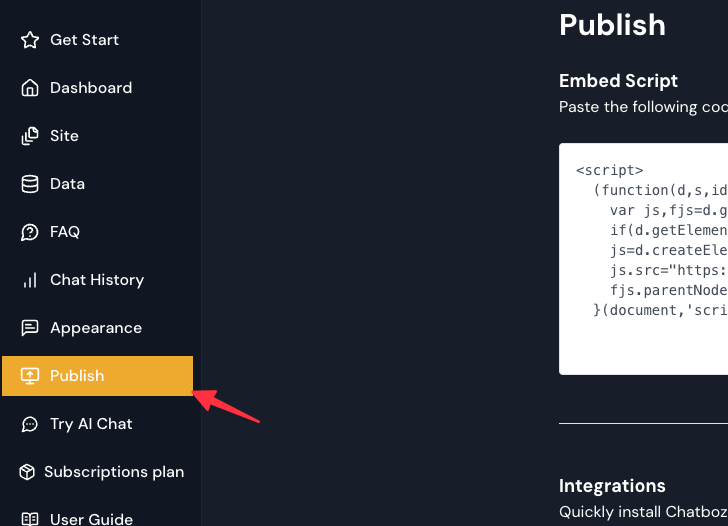
2. From the Dashboard, navigate to the Publish menu.\
3. On the Publish page, scroll to the Integrations section.
4. Locate the WordPress Integration option and click **Install**
5. Navigate to the “Chatboz – AI Chatbot & Live Chat” plugin page in the WordPress Plugin Directory and click Download
Method 1: Install from ZIP File
\
1\. Log in to your WordPress Admin Dashboard.\
2\. Navigate to Plugins → Add New → Upload Plugin.\
3\. Select the file physcode-chatbot.zip.\
4\. Click “Install Now”.\
5\. After installation, click “Activate Plugin”.
Method 2: Manual Installation
\
1\. Unzip the physcode-chatbot.zip file.\
2\. Upload the folder physcode-chatbot to /wp-content/plugins/.\
3\. Go to WordPress Admin → Plugins.\
4\. Find “Chatboz AI” and click “Activate”.\
✅ Once activated, a new menu item “AI Chatboz” will appear in your WordPress Admin sidebar.